Copy on your iPhone.
Paste on your PC.
Linkeja syncs your clipboard and sends files between all your devices — any mix of iPhone, Android, Windows, Mac and Linux. End-to-end encrypted, so only your own devices can read it. Nothing to install: it works in your browser.
See it
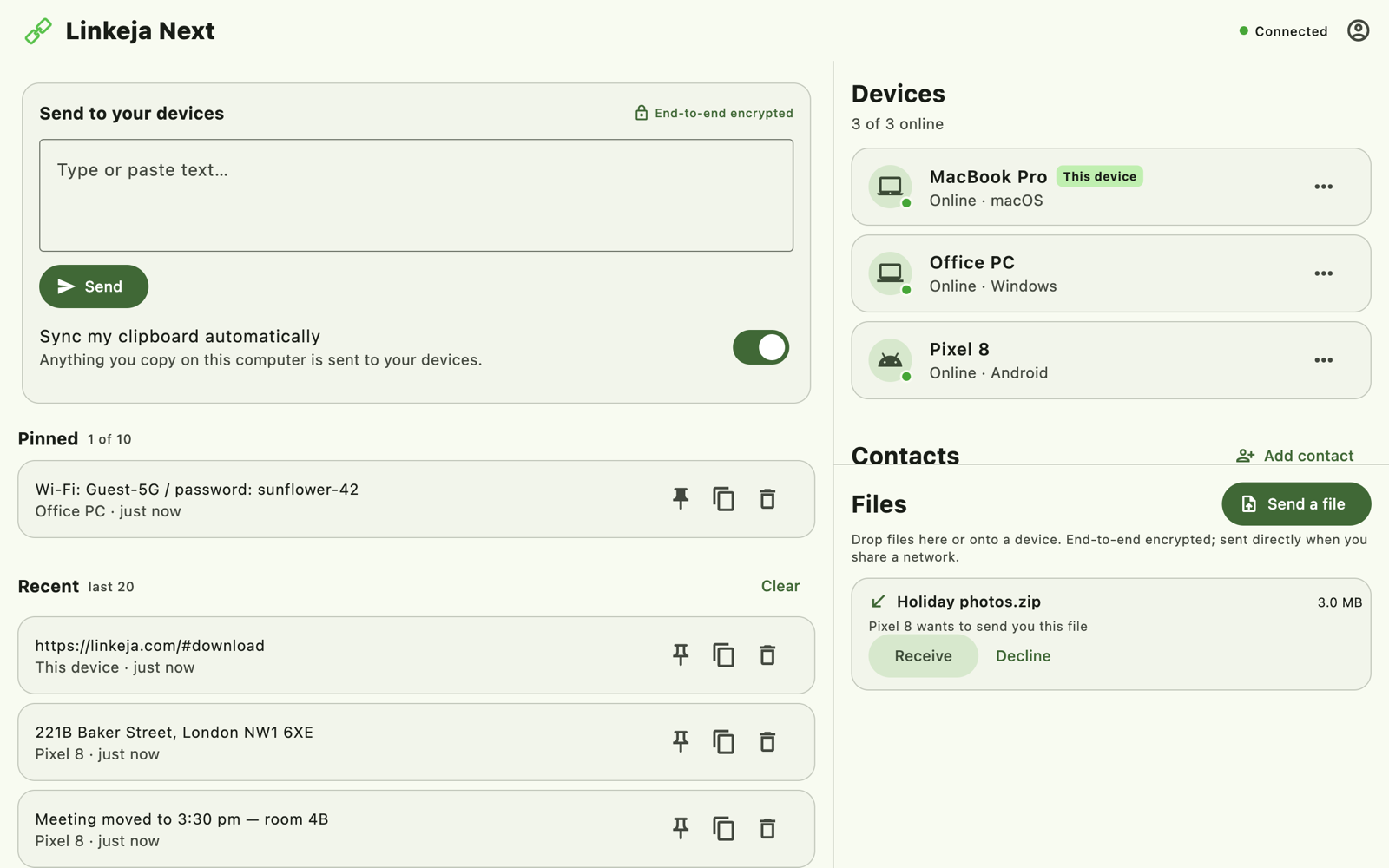
Your clipboard, your devices, your files — in one window
Everything you copy shows up on your other devices, with a history you can pin. Files arrive with one click — and between the apps, straight over your Wi-Fi when the devices are together.
Popular uses
What people use Linkeja for
Copy & paste between iPhone and Windows
There's no built-in way. Here's one that works today.
Read moreSend files between your phone and any PC
Even a work or lab computer where you can't install anything.
Read moreA free Pushbullet alternative
Clipboard and files across all your devices, end-to-end encrypted.
Read moreLinkeja vs KDE Connect, LocalSend & Pushbullet
An honest side-by-side, to pick what fits you.
Read moreHow it works
Up and running in a minute
Create an account on your first device, then approve each new one. Your devices just talk.
Create your account
Install Linkeja (or open the web app) and create an account. Your first device creates your encryption key — it never leaves your devices.
Approve your other devices
Sign in on another device and approve it from the first one by checking that both show the same code.
Copy, paste, send
Copy on one device and paste on another. Send files to any of your devices — or to a contact.
Features
Everything in sync, nothing in your way
Clipboard sync
Copy on your laptop, paste on your phone. On your computer it happens by itself; on phones, tap to send.
Clipboard history
Your last 20 items are kept across your devices, and you can pin up to 10 to keep them.
End-to-end encryption
Everything is encrypted on your device before it leaves. Only your devices hold the key — not even our servers can read it.
Fast file transfer
On the same Wi-Fi, files go straight between your devices at full speed; anywhere else, through our encrypted relay — with resume if the connection drops.
Contacts
Send files to friends and colleagues too: connect once with a one-time invite code, and their files reach you end-to-end encrypted.
Live device list
See which of your devices are online right now. Remove one and it is signed out instantly.
Secure by design
Your data moves on your terms
Linkeja handles your clipboard and files — so it's built so that nobody else can read them, including us.
- End-to-end encrypted. Clipboard items and files are encrypted on your device; the server only ever stores and relays ciphertext.
- You approve every device. A new device gets your key only after you compare a code on both screens.
- Instant control. Remove a device and it's cut off at once; your sign-in is protected against stolen sessions.
- No ads, no resale. We don't sell your data or run ads.
Approved devices.
End-to-end encrypted.
Yours alone.
Built in-house by Linkeja — no ads, no trackers, no third-party analytics.
Windows
Windows 10 & 11 · Microsoft Store
macOS
Intel & Apple Silicon · macOS 10.15+
The native app is on its way. Linkeja already works fully in your browser.
Use it in your browserLinux
Ubuntu 22.04+ · Debian 12+ (.deb)
Install with:
sudo apt install ./linkeja-next_3.0.0_amd64.deb
Or install with apt, with automatic updates
Run these in a terminal, one at a time:
sudo mkdir -p /etc/apt/keyrings
sudo wget -qO /etc/apt/keyrings/linkeja.gpg https://linkeja.com/apt/linkeja.gpg
echo "deb [arch=amd64 signed-by=/etc/apt/keyrings/linkeja.gpg] https://linkeja.com/apt stable main" | sudo tee /etc/apt/sources.list.d/linkeja.list
sudo apt update
sudo apt install linkeja-next
After that, sudo apt upgrade keeps Linkeja up to date.
Android
Android 7+
Web
Any modern browser · nothing to install
iPhone & iPad
In Safari · works today
Open the web app in Safari and tap Share › Add to Home Screen for one-tap access. The App Store app is on its way.
Open on your iPhoneFAQ
Questions, answered
Can I copy and paste between my iPhone and a Windows PC?
Yes. Open the Linkeja web app in Safari on your iPhone (add it to your Home Screen for one-tap access), and install Linkeja on your PC from the Microsoft Store — or use the web app there too. Paste text on one and it shows up on the other, end-to-end encrypted. See how, step by step.
Is my clipboard data private?
Yes. Linkeja is end-to-end encrypted: your clipboard items and files are encrypted on your device before they are sent, and only your approved devices hold the key. Our servers store and relay only encrypted data they cannot read. We don't sell your data and there are no ads.
Which platforms are supported?
Windows 10 and 11 (Microsoft Store), Linux (Ubuntu 22.04+ and Debian 12+) and Android have apps today. On iPhone and Mac, Linkeja runs in your browser — native apps are on the way. Computers with the app sync your clipboard by themselves; on phones and in the browser you send with a tap, because those systems don't let apps read the clipboard in the background.
Where is my encryption key stored?
Only on your own devices. Each device keeps its key in your system's secure storage, and the key that locks your data is handed to a new device only after you approve it by comparing a code on both screens. Our server never has it. See exactly how it works.
Is Linkeja open source?
Not at the moment. Instead we publish exactly how the encryption works — where your keys live, how devices are approved and what our server can and can't see — on How Linkeja protects your data, and we welcome questions and security reports at support@linkeja.com.
How is Linkeja different from KDE Connect, LocalSend or Pushbullet?
KDE Connect and LocalSend are excellent open-source tools built for devices on the same network. Linkeja also works when your devices are apart — at home, at work, on mobile data — still goes direct when they share a Wi-Fi, keeps an end-to-end encrypted clipboard history across devices, and runs in a browser where you can't install anything. See the full comparison.
What's the difference between local and cloud file transfer?
When your devices are on the same network, files go straight between them at full local speed. Otherwise they travel through our encrypted relay, and resume if the connection drops. Either way they are end-to-end encrypted.
How much does it cost?
Linkeja is free. If we ever add paid plans, we'll give clear notice first — and what you have today stays free.
What happens to my data if Linkeja shuts down?
Files you receive are saved on your own devices, and your clipboard history is short-term by design, so nothing you rely on is locked inside our service.
I used Linkeja before. Do I need a new account?
Yes. Linkeja 3 is a complete rebuild with new accounts and much stronger encryption. Install the new app (on Android it arrives as an update), create an account, then approve your other devices from the first one. Items from the previous version aren't carried over.
How do I get started?
Install Linkeja or open the web app, create an account, then sign in on your other devices and approve them. Our step-by-step guide walks you through everything, with screenshots.